Print

How to view order details, payments, and customer information

The order details page is your central hub for understanding everything about a customer’s purchase. Whether you’re tracking fulfillment, checking payment status, or assisting a customer, this page brings all essential information together—clearly organized and easy to access.

Each order includes a detailed breakdown of products purchased, payment information, customer details, and the complete order timeline, ensuring you always have the full picture.
Accessing order details

Simple Notes and Image Layout
  1. Go to your admin dashboard.
  2. Navigate to Catalog → Orders. Select any order from the list.
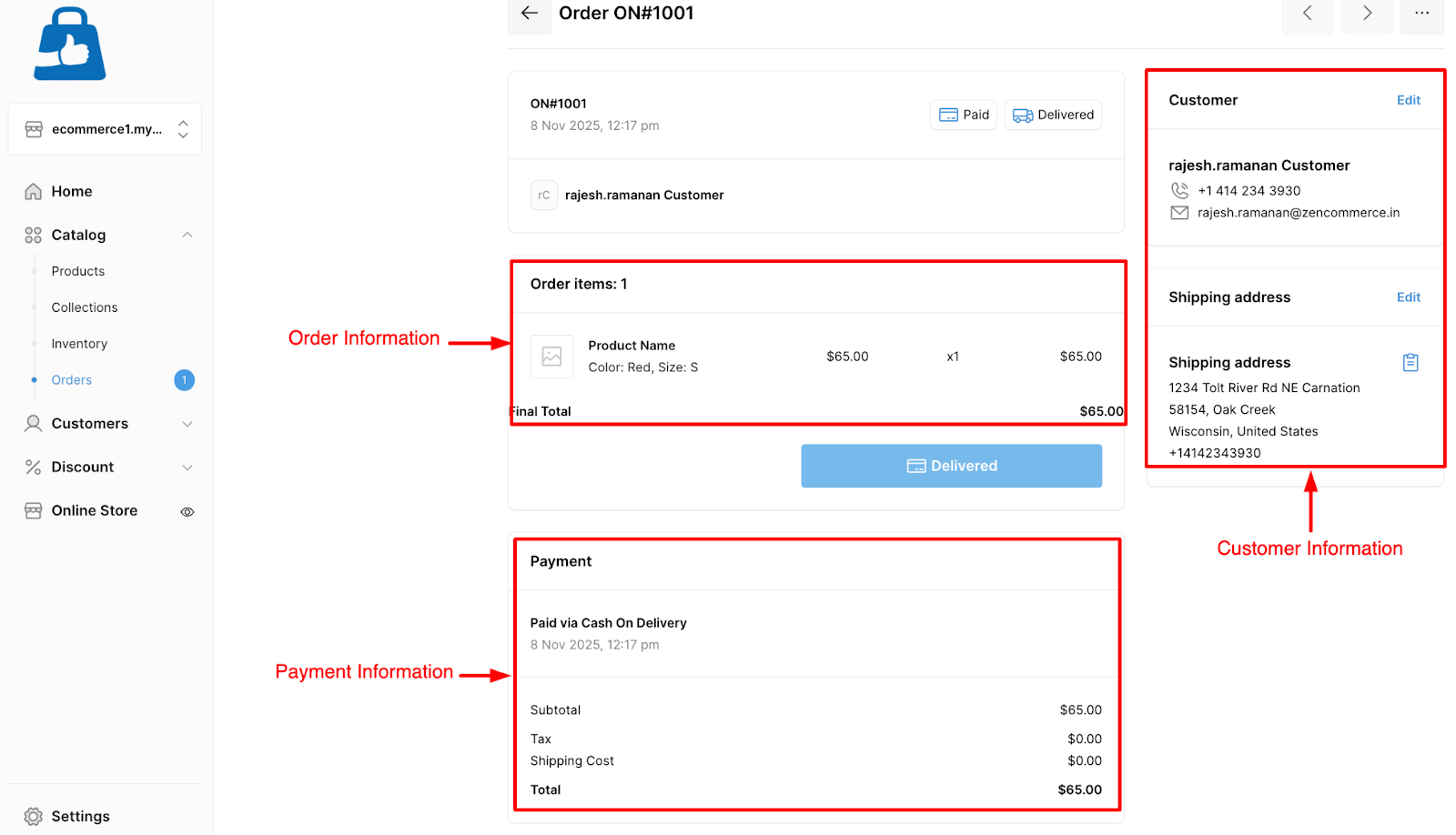
  3. You’ll see the “Order details” View, which contains multiple sections:
Placeholder Image

Order summary section

The order summary gives you a quick but comprehensive overview of the entire purchase. This includes:

Simple Notes and Image Layout
  • Order ID
  • Order date
  • Order status
  • Products purchased (with quantity and price)
  • Discounts and total amount
  • Payment method and shipping details
Placeholder Image
Tip: Click on any “product name” to open the specific product details page for quick reference.

Payment information section

The payment details area gives you a clear view of how the customer paid and whether the payment was successful. Here, you’ll find:

Simple Notes and Image Layout
  • Payment status: Paid, pending, or failed
  • Payment method: Payment made via cash on delivery, payment gateways for credit/debit card, etc.
  • Subtotal, tax, and shipping cost
  • Discounts or coupons applied
Placeholder Image
Tip: Use this section to verify successful payments before initiating shipment or refund.

Customer information section

To help you manage deliveries and communicate with customers, the customer information section includes:

Simple Notes and Image Layout
  • Customer name and email
  • Billing and shipping address
  • Contact number
Placeholder Image
Tip: Use customer contact details to reach out directly for any clarifications or delivery updates.

Order timeline

Track every event in the order lifecycle, including:

Simple Notes and Image Layout
  • Order placed date
  • Payment confirmation
  • Shipment and delivery updates
Placeholder Image

Scroll to Top