
Setting up Mercado Pago Payment Gateway
Mercado Pago is the largest online payment platform in Latin America, enabling businesses to securely accept payments through various local payment methods.
It supports operations in seven countries and allows merchants to receive payments directly in their local currency, providing a smooth experience for both buyers and sellers.
Mercado Pago operates in the following Latin American countries:
| Argentina | Brazil | Chile |
| Colombia | Mexico | Peru |
The platform fully supports the local currency of each country and allows businesses to receive payments from multiple payment sources such as credit/debit cards, bank transfers, and digital wallets—all in your local currency.
How to set up Mercado Pago Payment Gateway
- Navigate to Payment Settings
- Log in to your eCommerce Admin Panel.
- Go to Settings → Payments.
- Click on Add Payment Method.
- Select Mercado Pago
- In the pop-up window, choose Mercado Pago as your payment provider.
- If Mercado Pago is not listed, your current store currency may not be supported (see the section below).
- Enable the Payment Method
- Toggle the Enable Payment Method switch to activate Mercado Pago.
- Enter the Public Key and Access Token from your Mercado Pago account
Where to find your credentials:- Log in to your Mercado Pago Business Account.
- Navigate to:
Your Business → Settings → Management and Administration → Credentials - Copy your Public Key and Access Token.
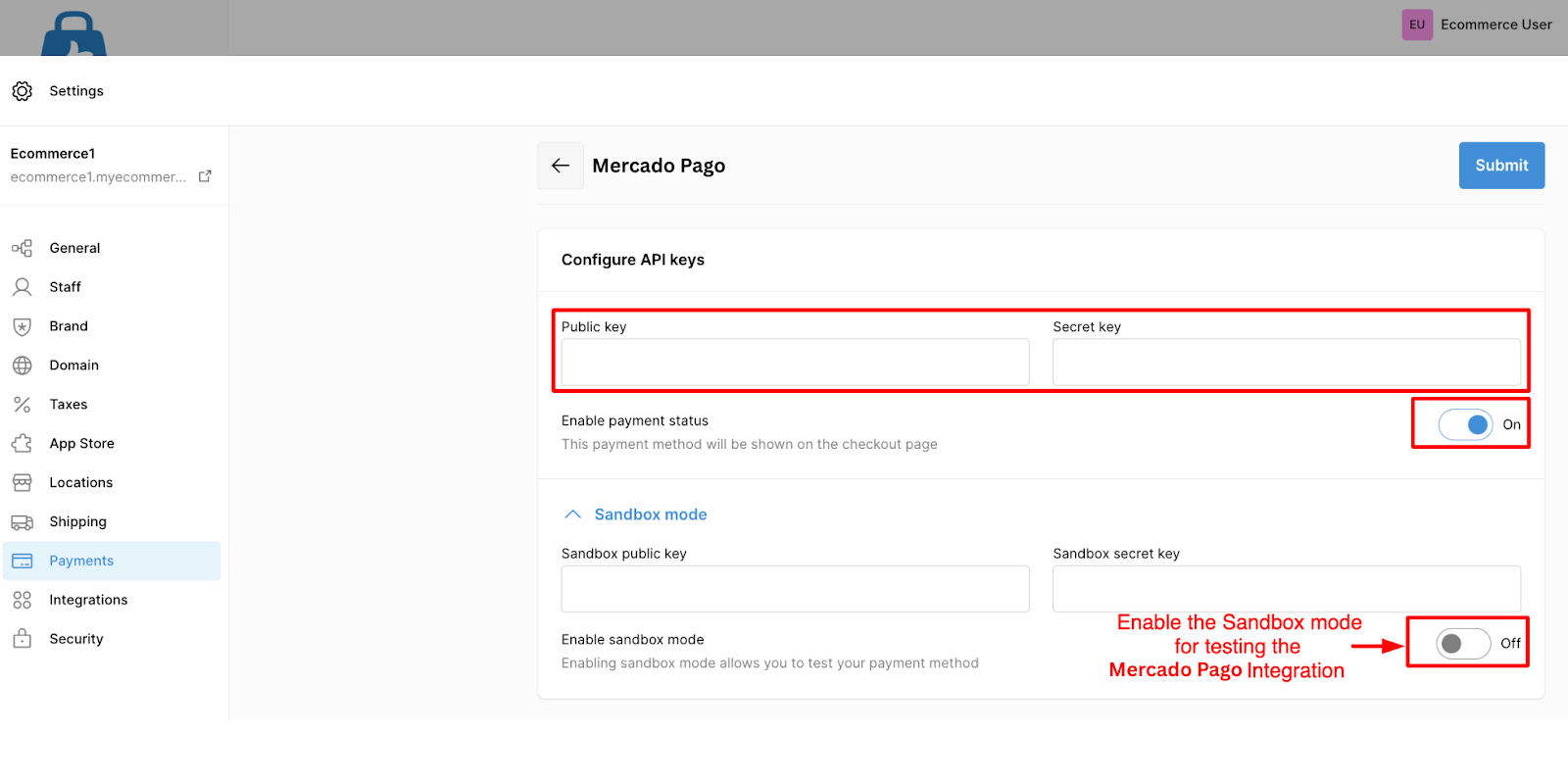
Sandbox Mode (Test Environment)
You can test Mercado Pago payments before going live:
- In your eCommerce admin panel, go to More Options on the Mercado Pago setup page.
- Enable the Sandbox Mode toggle.
- Enter the same Public Key and Access Token in the Test Secret Key field.
- Save your changes.
This allows you to test checkout payments without processing real transactions.
Mercado Pago Supported Currencies
Mercado Pago only accepts payments in the local currency of your account’s country.
| Country | Currency Name | Code |
|---|---|---|
| Argentina | Argentine Peso | ARS |
| Brazil | Brazilian Real | BRL |
| Chile | Chilean Peso | CLP |
| Colombia | Colombian Peso | COP |
| Mexico | Mexican Peso | MXN |
| Peru | Peruvian Sol | PEN |
| Uruguay | Uruguayan Peso | UYU |
Mercado Pago isn’t available with your Store Currency
If Mercado Pago does not appear as an available payment method, your store currency is not supported by Mercado Pago.
To fix this, you must switch your store’s currency to one that Mercado Pago supports.
How to change your Store Currency
- Go to Settings → General in your eCommerce admin panel.
- Click on Standards and Formats.
- Select a Mercado Pago-supported currency from the Currency dropdown.
- Save your changes.