
Setting up your LLMs.txt integration to boost your AI search visibility
The way customers search for products is rapidly evolving. Shoppers are increasingly turning to AI powered search engines and conversational assistants like ChatGPT, Claude, Gemini, and Perplexity, and Claude to discover brands, compare products, and seek recommendations. This shift requires a move beyond traditional Search Engine Optimization (SEO) into Generative Engine Optimization (GEO) and Answer Engine Optimization (AEO).
Unlike traditional search crawlers that look for meta tags and keyword density, AI engines need structured, easily digestible context to understand your brand. By providing a dedicated llms.txt file, you give these AI models a perfect, centralized summary of your catalog, shipping policies, and brand values. This significantly increases the likelihood that your products will be accurately cited and recommended when a potential buyer asks an AI assistant for shopping advice.
Understanding the reference file
The llms.txt integration is a smart solution to a complex technical requirement. Rather than forcing AI models to randomly scrape your website, this feature serves a clean, plain text document directly from your storefront’s root directory (e.g., [https://yourdomain.com/llms.txt]).
Here is how the file functions to build your AI authority:
- Structured business context: The file organizes your core identity, including primary business locations, shipping regions, and customer support channels, ensuring AI engines never hallucinate your basic policies.
- Catalog and content mapping: It outlines your primary product categories, content inventory (e.g., total products and variants), and SEO description strategies, acting as a direct map for AI to understand what you sell in your online store.
- Data privacy control: The file explicitly states what the AI is allowed to use for training, establishing clear boundaries that protect sensitive business metrics.
Configuring and uploading your file
Preparing your store for AI search engines requires customizing a simple text document and uploading it to your storefront admin. Follow these steps to establish your AI presence:
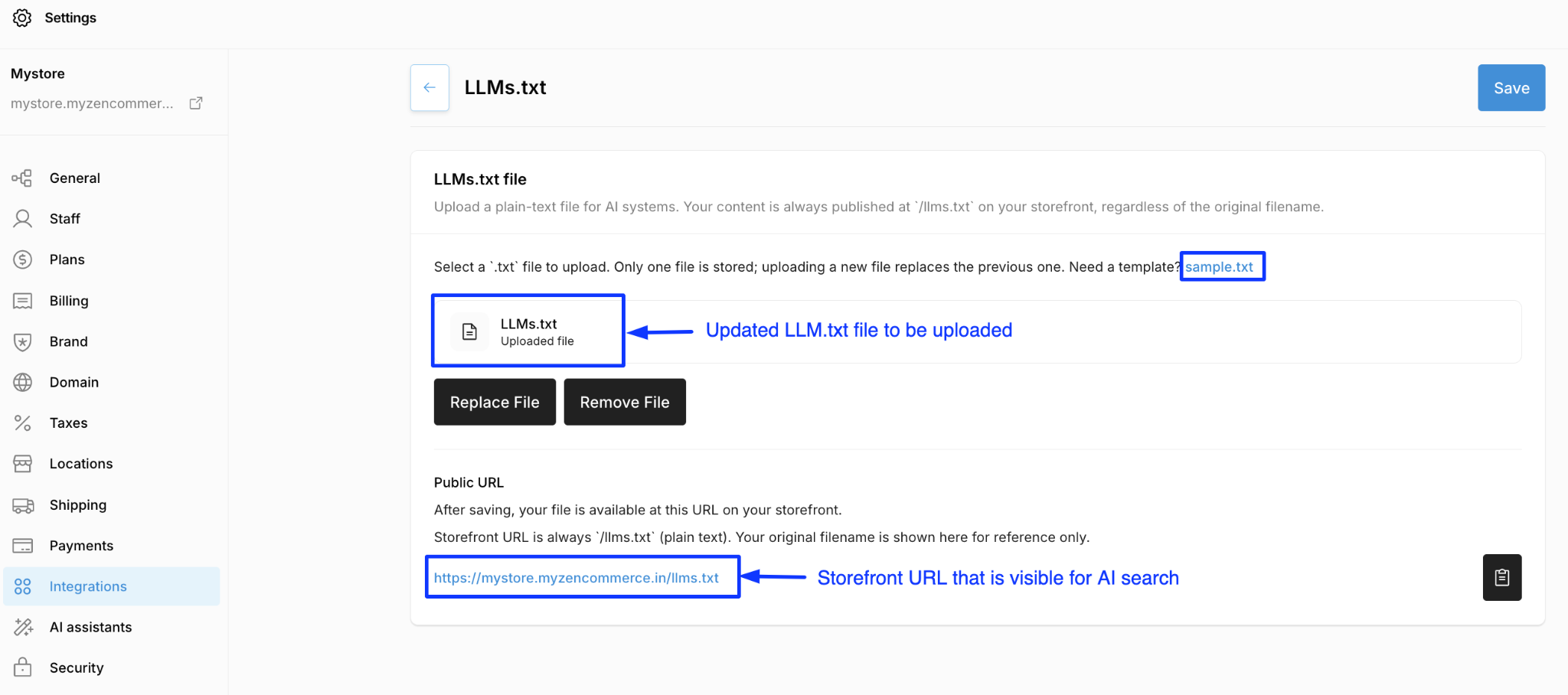
- Open your admin panel and go to Settings → Integrations → LLMs.txt. Click “Upload file” which navigates to the LLM.txt integration page.
- Download or copy the complete contents of the reference sample.txt template.
- Replace all the placeholder example values with your actual business information. Ensure you update specific sections such as your business name, URL, shipping details, and main product categories.
- Save your customized document strictly as a plain text file and name it exactly llms.txt. Do not use rich text formats like .docx or .pdf.
- Click the “Select file” button and select the plain text file you just saved from your computer.
- Once uploaded, test the integration by visiting your live domain followed by /llms.txt(e.g., [https://yourdomain.com/llms.txt](https://yourdomain.com/llms.txt)) to ensure the text renders correctly in the browser.
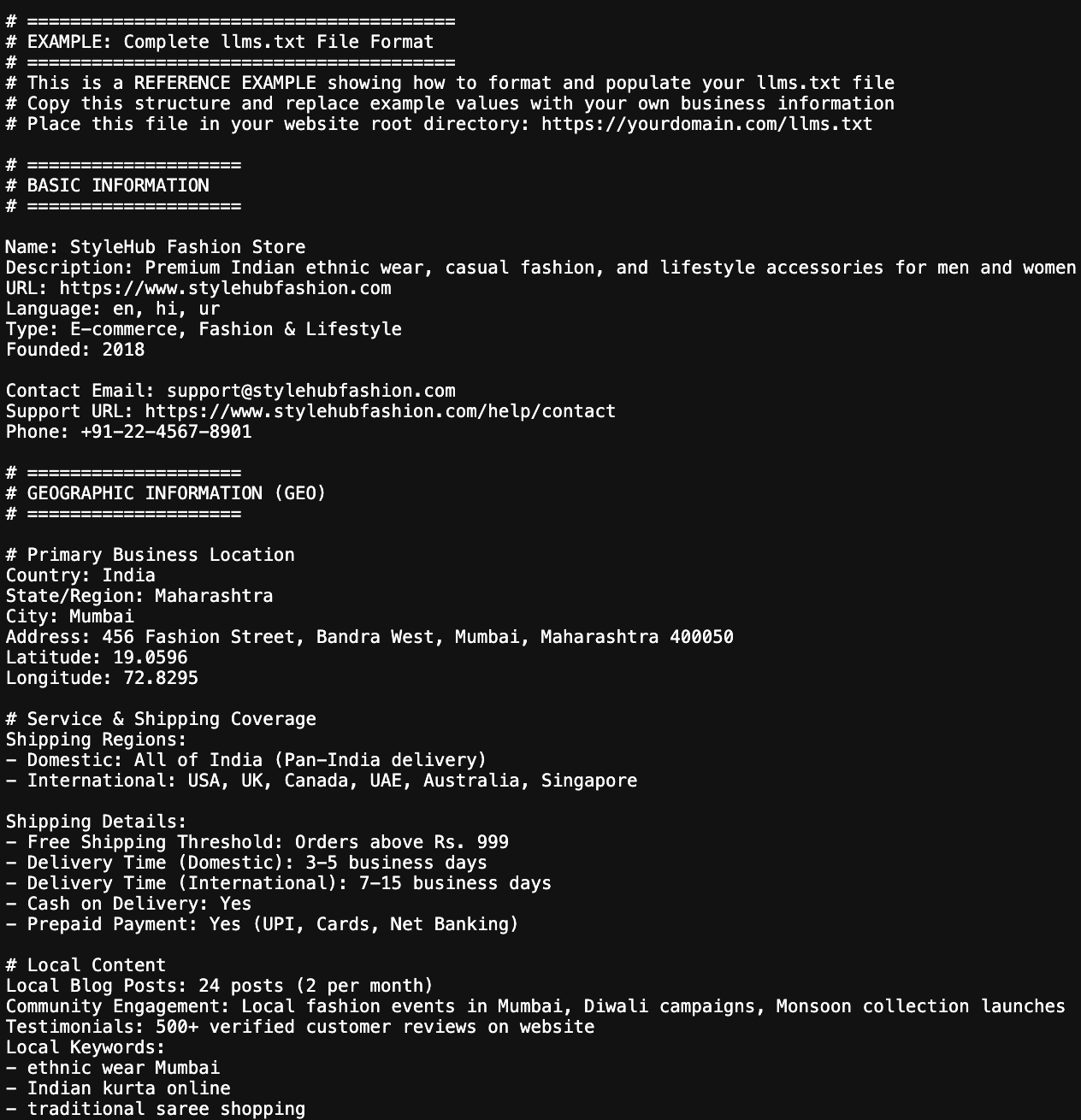
Maintaining your AI authority: Best practices
An outdated llms.txt file can cause AI engines to confidently provide incorrect information to your customers. Execute these best practices to maintain a high quality data feed.
Enforce strict data privacy
Never include sensitive information in this file. Explicitly exclude customer personal information (names, emails, addresses), payment details, transaction histories, and account passwords. The file is publicly accessible to any crawler, so it must only contain safe, public facing marketing and operational data.
Update during major seasonal shifts
Keep the file updated at least quarterly. If your business revolves around seasonal collections (like a Summer sale or a Holiday promotion), update the “Seasonal Highlights” and “Current Promotions” sections of your text file to reflect active discount codes and valid dates.
Be highly specific with metrics
AI models rely on specific numbers to establish confidence. Rather than stating you have “many products” or “fast shipping,” explicitly list your metrics, such as “Total Products: 2,847” or “Delivery Time (Domestic): 3-5 business days”. Precision in your text file directly translates to accuracy in AI generated answers.