
-
Integrations
- Articles coming soon
-
Marketing
-
- Advertising white-label eCommerce solution to your customer ecosystem
- Advertising compliance and brand usage guidelines for partners
- How to create high-converting advertisements for your eCommerce platform
- How to run advertising campaigns to attract online merchants and resellers
- How to measure advertising performance and generate qualified merchant leads
-
- How to promote your eCommerce platform using consistent branding
- White-Label eCommerce branding strategy for partners
- Crafting effective brand messaging for eCommerce platforms
- Positioning your eCommerce platform for different merchant segments
- Maintaining brand consistency across marketing channels
-
- Creating High-Impact eCommerce marketing assets for partners
- Designing eCommerce sales decks that convert merchants
- Creating eCommerce landing pages that convert traffic into merchants
- Creating eCommerce case studies that build trust and close deals
- Creating Email campaigns that drive eCommerce adoption
-
-
Partner Hub
-
- Articles coming soon
-
- Articles coming soon
-
-
Sales
-
- Articles coming soon
-
- Articles coming soon
-
- Articles coming soon
-
- Articles coming soon
-
- Articles coming soon
-
-
Technical and Support
-
- Articles coming soon
-
- Articles coming soon
-
- Articles coming soon
-
- Articles coming soon
-
- Articles coming soon
-
- Articles coming soon
-
-
-
-
-
-
-
- Payment methods at eCommerce Store
- Setting up Stripe Payment Gateway
- Setting up Paypal in your Online Store
- Setting up CashFree Gateway
- Setting up RazorPay Gateway
- Setting up Paystack gateway
- Setting up Flutterwave Gateway
- Setting up Mercado Pago Gateway
- Setting up Mamo Pay Gateway
- Setting up Yoco Gateway
- Setting up Nets Easy Gateway
- Setting up Vipps Gateway
- Setting up Mollie Gateway
- Setting up Epoint Gateway
- Setting up Iyzico Gateway
- Setting up Payriff Gateway
- Setting up Crypto Payments through Nicky
- What is Cash on Delivery?
- Show Remaining Articles (3) Collapse Articles
-
- How to create an analytics account?
- Connecting Google Analytics to your eCommerce store
- Connecting Meta Pixel to your eCommerce store
- Connecting Tik Tok Pixel to your eCommerce store
- Connecting Google Tag Manager to your eCommerce store
- Managing product reviews & ratings in your eCommerce store
- Using marketing automation to drive urgency and social proof
- Setting up your LLMs.txt integration to boost your AI search visibility
- Automating manual order fulfilment and live tracking with Shiprocket
- Automating search engine discoverability with dynamic sitemaps
- Automate, optimise, scale: Building your Google shopping product feed
- How to sync your product catalog with meta ads to drive more sales
-
- Articles coming soon
-
- Articles coming soon
-
- Articles coming soon
-
Print
Posted
Updated
ByeCommerce Admin
Setting up Cashfree Gateway
Cashfree Payment Gateway is a secure and widely used solution that enables businesses in India to accept online payments. It supports multiple payment modes including credit/debit cards, UPI, net banking, and digital wallets, allowing customers to pay seamlessly in Indian Rupees (INR).
This guide walks you through the steps to configure and enable Cashfree as a payment provider in your online store.
Why use Cashfree?
- Smooth and reliable payment experience for Indian customers.
- Supports UPI, cards, wallets, and net banking.
- Fast settlements and instant refunds.
- Real-time payment tracking and reporting.
- Works exclusively with INR, making it ideal for Indian merchants.
How to Integrate Cashfree Payment Gateway
Step 1: Go to Payment Settings
- Log in to your Admin Panel.
- Navigate to Settings → Payments.
- Click Add Payment Method.
Step 2: Select Cashfree Payment Gateway
- A pop-up window will appear.
- From the Payment Gateway dropdown, choose Cashfree Payment Gateway.
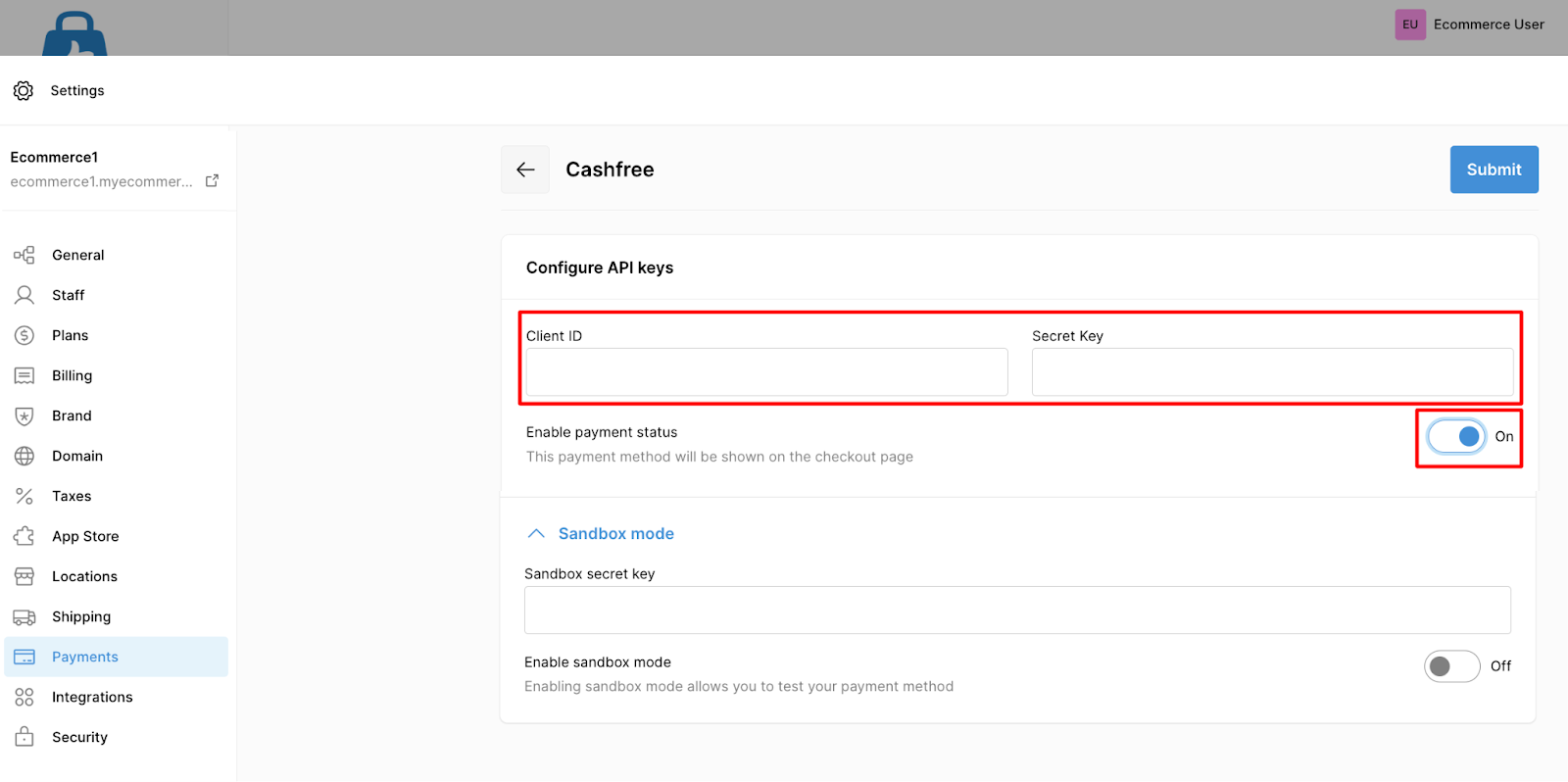
Step 3: Enter Integration Details
You will need the following credentials from your Cashfree Merchant Dashboard:
| App ID (Client ID) | Secret Key |
How to get your Cashfree API credentials:
- Log in to your Cashfree Merchant Dashboard.
- Navigate to Developer → API Keys / Credentials.
- Copy your App ID and Secret Key.
Add the credentials to your store:
- Paste the App ID and Secret Key in the respective fields in your store’s setup pop-up.
- Click Save.
Step 4: Verify Currency Settings
Cashfree only supports payments in Indian Rupees (INR).
To ensure successful integration:
- Verify that your store’s default currency is set to INR.
If your store is using a different currency, you must change it before enabling Cashfree.