
Managing product reviews & ratings in your eCommerce store
In the modern eCommerce landscape, buyer trust is the ultimate currency. Shoppers rely heavily on the experiences of others to validate their purchasing decisions. By activating product reviews and ratings on your storefront, you are leveraging user generated content (UGC) to lower buyer friction and build immediate credibility.
Authentic customer reviews act as a powerful form of social proof, signaling to potential buyers that your products deliver on their promises. Furthermore, establishing a constant flow of reviews naturally builds organic SEO, as search engines favor product pages with fresh, relevant, and keyword rich customer feedback.
Understanding the review mechanics
Your eCommerce platform provides an extensive suite of tools to capture, manage, and display customers’ feedback directly on your product pages. Here is how the core functionalities operate internally:
- Global review vs. star ratings: The platform separates written feedback from visual ratings. You can enable text based reviews globally and choose whether to allow customers to submit a quick 5 star rating alongside their comments. This flexibility lets you capture detailed testimonials or instant social proof.
- Visual proof via image uploads: Shoppers trust customer photos more than polished brand photography. The system allows you to accept image attachments with reviews, empowering your buyers to provide authentic visual proof of the product./li>
- Review content screening: To protect your brand from spam or malicious content, the platform includes a user reviews content screening layer. By requiring admin approval, reviews are held in a pending state until you or your team explicitly clear them for public display.
Configuring your review system
Setting up your review workflow is a straightforward process managed directly from your storefront admin panel. Follow these steps to tailor the system to your operational needs:
- In your storefront admin panel, go to Settings → Integrations.
- Locate the “Product Reviews” card and click the “Configure” button to open your setup options.
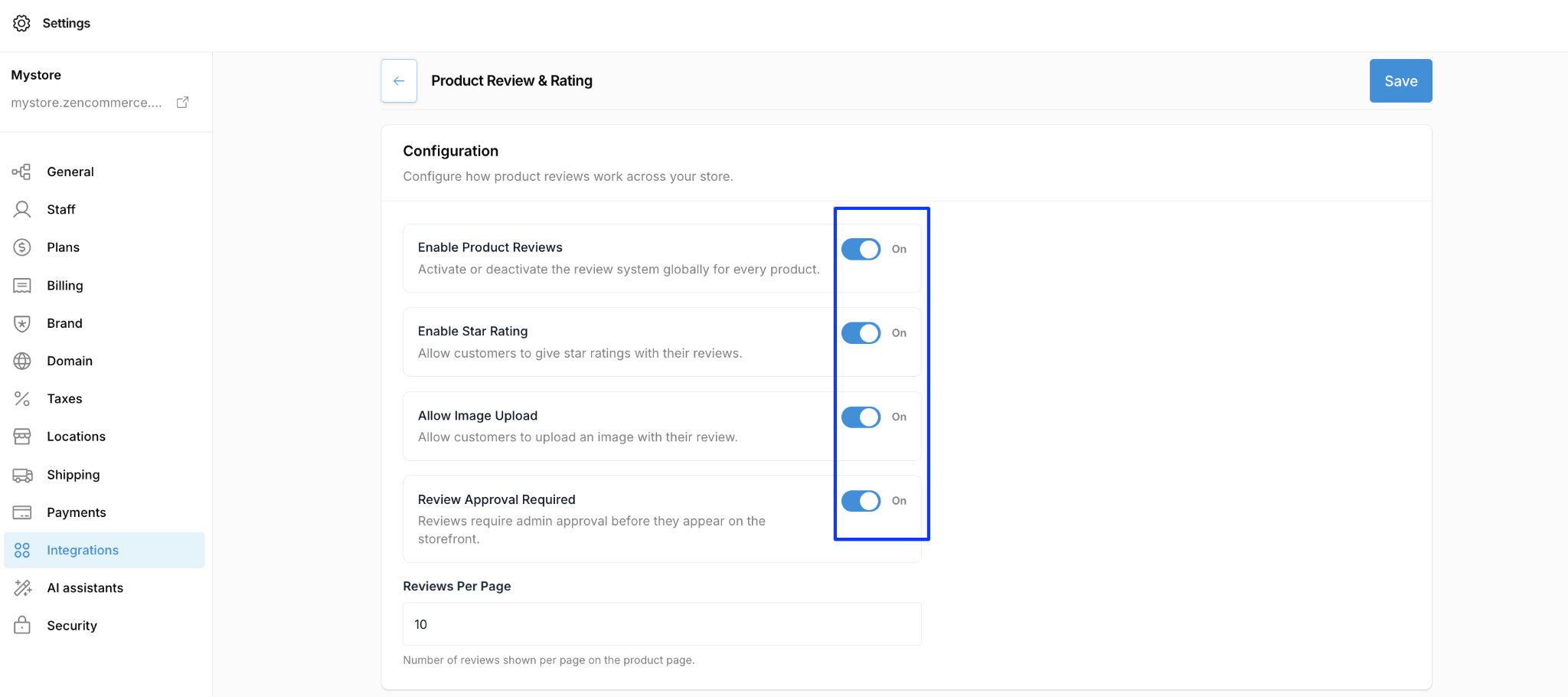
- Activate the core system:
- Toggle “Enable Product Reviews” to On to activate the review system globally across every product.
- Toggle “Enable Star Rating” to On to allow customers to leave star based scores.
- Enable visual content:
- Toggle “Allow Image Upload” to On if you want customers to attach photos to their submissions.
- Secure your brand reputation:
- Toggle “Review Approval Required” to On. This ensures no review appears on your live storefront without your explicit consent.
- Set pagination limits:
- In the “Reviews Per Page” field, enter a numeric value (e.g., 10) to control how many reviews should be displayed at once on the product detail page.
- Click Save to apply your configurations to the live storefront.
Leveraging your user generated content (UGC)
Activating the feature is just the first step. To truly scale your business using product reviews, integrate these best practices into your daily operations:
Establish a daily moderation workflow:
If you have enabled “Review Approval Required”, pending reviews that pile up cannot aid your conversions. Assign a team member to review and approve submissions daily. Quick approvals show active customers that their feedback is valued and quickly surfaces fresh social proof for new buyers.
Optimize page performance with smart pagination:
While you want to display as much social proof as possible, loading hundreds of text blocks and image uploads simultaneously will drastically slow down your product page load times, negatively impacting your SEO and bounce rates. Keep the reviews per page setting optimized, typically at 10, to balance rich user engagement with faster mobile loading speeds.
Lean into negative feedback:
Do not automatically reject 3 star or 4 star reviews. A storefront with exclusively 5 star reviews can appear artificial to modern consumers. Moderate and approve constructive criticism, and use the opportunity to showcase your stellar customer service by addressing the customer’s concerns promptly. Authenticity converts better than perfection.